StarNama Telegram Bot: 24/7 Website Uptime Alerts Inside Telegram
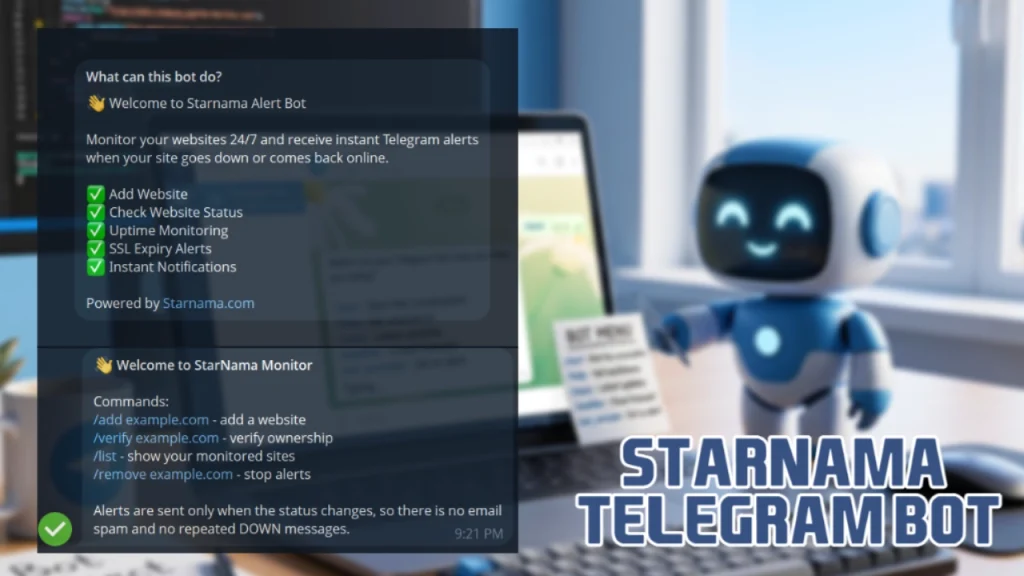
The StarNama Telegram Bot, available at
https://t.me/Starnamabot, is a simple and powerful website monitoring assistant that helps website owners, developers, bloggers, businesses and SEO professionals check uptime, HTTP status and response time directly inside Telegram.
Instead of waiting until visitors complain that your website is down, StarNama can notify you when a monitored website becomes unavailable and again when it comes back online. This makes it easier to protect your traffic, your search rankings, your brand trust and your online revenue.
What Is the StarNama Telegram Bot?
StarNama Telegram Bot is a Telegram-based website uptime monitoring bot connected to the StarNama platform. It allows verified website owners to monitor their websites and receive instant alerts when a site goes down, comes back online, has a response issue or needs attention.
The bot is designed for people who want quick website status updates without opening a dashboard every time. Once your website is claimed and verified through StarNama, you can use the Telegram bot to manage monitoring, check your website status and receive real-time notifications.
This is especially useful for website owners who run WordPress sites, SaaS tools, online stores, blogs, file converter websites, API services, landing pages, news websites or business websites where uptime matters.
Why Website Uptime Monitoring Matters
Website downtime can happen for many reasons: hosting problems, server overload, DNS issues, SSL errors, firewall blocks, expired certificates, broken scripts, database problems or temporary network failures. Even a few minutes of downtime can affect user trust and business performance.
If your website is unavailable, visitors may leave, search engine crawlers may fail to access important pages, paid ad traffic may be wasted and customers may lose confidence. For websites that depend on SEO, subscriptions, AdSense, affiliate sales, e-commerce orders or API usage, uptime is not just a technical detail. It is part of the website’s reliability.
The StarNama Telegram Bot helps you react faster by sending alerts only when the website status changes. That means you do not receive repeated spam messages every minute. You get useful notifications when something important actually happens.
How the StarNama Telegram Bot Works
The StarNama Telegram Bot works together with the StarNama website analysis and monitoring system. When you analyze a website on StarNama, the report page includes a section called Claim This Website. This section allows you to register and verify ownership of your website.
After your website is claimed and verified, you can connect it with the Telegram bot and use Telegram for uptime monitoring. Once enabled, the bot checks your website status and sends alerts when your website goes down or comes back online.
The basic process is simple:
- Analyze your website on StarNama.
- Open the website report page.
- Find the Claim This Website section.
- Register and verify your website ownership.
- Open @Starnamabot on Telegram.
- Add your verified website to monitoring.
- Receive instant Telegram alerts when the status changes.
This verification step is important because alerts should only be managed by the real website owner or an authorized person. It also keeps the monitoring system cleaner and more reliable.
What You See When You Open the Bot
When users open the StarNama Alert Bot, they see a welcome message that clearly explains the main purpose of the bot:
👋 Welcome to Starnama Alert Bot
Monitor your websites 24/7 and receive instant Telegram alerts when your site goes down or comes back online.✅ Add Website
✅ Check Website Status
✅ Uptime Monitoring
✅ SSL Expiry Alerts
✅ Instant NotificationsPowered by Starnama.com
This gives users a quick overview of what the bot can do. It is not just a simple status checker. It is built for practical monitoring, fast notifications and website reliability.
StarNama Monitor Bot Commands
After starting the bot, users can manage their monitored websites with simple Telegram commands. The bot introduces itself with the following command list:
👋 Welcome to StarNama Monitor
Commands:
/add example.com – add a website
/verify example.com – verify ownership
/list – show your monitored sites
/remove example.com – stop alertsAlerts are sent only when the status changes, so there is no email spam and no repeated DOWN messages.
/add example.com
This command is used to add a website to the monitoring list. For example, if you want to monitor example.com, you can use:
/add example.com/verify example.com
This command helps verify website ownership. Verification is important because it confirms that you are allowed to manage monitoring alerts for that website.
/verify example.com/list
This command shows the websites currently connected to your Telegram monitoring account. It is useful when you monitor multiple websites and want to check which domains are active.
/list/remove example.com
This command stops alerts for a website. If you no longer want to receive Telegram notifications for a specific domain, you can remove it from monitoring.
/remove example.comInstant DOWN and UP Alerts
One of the most important features of the StarNama Telegram Bot is instant status-change alerts. The bot does not flood your Telegram with repeated messages. Instead, it sends alerts only when the status changes.
For example, if your website is working normally and then becomes unavailable, you receive a DOWN Alert. If the website comes back online later, you receive an update that the website is available again.
A downtime alert can look like this:
🔴 DOWN Alert
Website: einzeo.com
Status: UP → DOWN
HTTP: cURL error 28: Connection timed out after 6001 milliseconds
Response: 6004ms
Checked: 2026-05-27 09:00:29
Report: https://starnama.com/status/einzeo-com/
This alert gives you useful technical details immediately. You can see the affected website, the previous and current status, the HTTP or connection error, the response time, the exact check time and a link to the full StarNama report.
Key Features of StarNama Telegram Bot
1. Website Uptime Monitoring
The bot monitors your website and helps you know whether it is online or offline. This is useful for business websites, blogs, SaaS platforms, web tools and online stores.
2. HTTP Status Checking
StarNama can help detect HTTP status issues such as unavailable pages, server errors, redirect problems or connection failures. Knowing the HTTP status helps you understand whether the problem is temporary, server-side or related to configuration.
3. Response Time Tracking
The bot can show website response time, which helps you understand how quickly your website responds. Slow response time can affect user experience, conversions and search performance.
4. SSL Expiry Alerts
SSL certificates are essential for secure websites. If an SSL certificate expires, browsers may show warnings and users may leave immediately. StarNama helps website owners stay aware of SSL-related issues before they become a serious problem.
5. Instant Telegram Notifications
Telegram alerts are fast, simple and easy to manage. You do not need to check your email constantly or log in to a dashboard every hour. Important website events can arrive directly in Telegram.
6. No Repeated DOWN Spam
The bot sends alerts only when the website status changes. This is a practical feature because repeated alerts can become annoying and make monitoring less useful. StarNama focuses on meaningful notifications.
7. Full Report Link
Each alert can include a link to the website status report on StarNama. This allows you to investigate the problem in more detail and review additional website health information.
Who Should Use the StarNama Telegram Bot?
The StarNama Telegram Bot is useful for many types of users:
- Website owners who want to know when their site goes offline.
- WordPress admins who manage blogs, business websites or WooCommerce stores.
- SEO specialists who want to protect crawlability and website reliability.
- Developers who manage client websites, APIs or web apps.
- Agencies that monitor multiple customer websites.
- Online businesses that depend on uptime for sales, leads or subscriptions.
- Content publishers who want to protect traffic from downtime problems.
- Tool websites that need constant availability for users and search engines.
If your website matters to your business, brand or traffic, then uptime monitoring should not be optional. A simple Telegram alert can save you hours of unnoticed downtime.
Why Telegram Alerts Are Useful for Website Monitoring
Many website monitoring tools rely mainly on email alerts. Email is useful, but it can be slow, ignored or mixed with other messages. Telegram is different because it is fast, direct and commonly used on mobile devices.
With the StarNama Telegram Bot, downtime alerts can reach you quickly, even when you are away from your computer. This makes the bot useful for small website owners as well as professional teams.
Telegram monitoring is also convenient because commands are simple. You can add, verify, list or remove websites without going through a complicated interface.
StarNama Bot and SEO: Why Uptime Can Affect Search Performance
Search engines need to access your website to crawl, render and index your pages. If your website is frequently down or very slow, it can create problems for both users and search engine crawlers.
Downtime does not always cause immediate ranking loss, but repeated availability problems can hurt trust, crawl efficiency and user experience. For websites that depend on organic traffic, monitoring uptime is part of technical SEO.
StarNama Telegram Bot helps website owners catch problems earlier. Instead of discovering downtime hours later, you can receive an alert and take action quickly. This is especially important for websites with many indexed pages, dynamic tools, API endpoints, paid campaigns or high-value landing pages.
How Claim This Website Connects StarNama Reports With Telegram Monitoring
The Claim This Website feature is an important part of the StarNama monitoring system. When you check a website on StarNama, the analysis page can include a claim section. By claiming and verifying the website, you prove that you are the owner or authorized manager of that domain.
After verification, you can use the Telegram bot for ongoing monitoring. This creates a connection between the public website report and your private monitoring alerts.
This approach is useful because anyone may be able to check a public website status, but only the verified owner should manage alerts, remove monitoring or receive private status-change notifications.
Example Use Case: A Website Goes Down
Imagine you run a website and your server suddenly stops responding. Without monitoring, you may not notice the problem until visitors message you, sales drop or search crawlers fail to access your pages.
With StarNama Telegram Bot enabled, the process is much faster:
- Your website is checked by the monitoring system.
- The system detects that the website changed from UP to DOWN.
- The Telegram bot sends a DOWN alert.
- You see the error, response time and report link.
- You check your hosting, server, SSL, DNS or firewall settings.
- When the website comes back online, you receive a recovery alert.
This simple workflow helps reduce downtime and makes website management much easier.
Benefits of Using StarNama Telegram Bot
StarNama Telegram Bot gives website owners a practical way to stay informed without needing advanced technical knowledge. It is built around one simple idea: if your website status changes, you should know quickly.
- Monitor websites directly from Telegram.
- Receive alerts when a site goes down.
- Get notified when a site comes back online.
- Check HTTP status and response time.
- Track SSL expiry problems.
- Use simple commands to manage websites.
- Avoid repeated downtime spam messages.
- Open full StarNama reports for deeper analysis.
How to Start Using StarNama Telegram Bot
Getting started is easy. Open the Telegram bot, start it and follow the available commands. For the best experience, first analyze your website on StarNama and use the Claim This Website section to verify ownership.
After your website is verified, you can add it to Telegram monitoring and receive instant alerts when something changes.
Open the bot here:
Final Thoughts
The StarNama Telegram Bot is a useful tool for anyone who wants faster website uptime alerts without constantly checking dashboards or emails. It brings website monitoring directly into Telegram and helps website owners react quickly when downtime, slow response or SSL issues appear.
If you manage a website, uptime is part of your online reputation. A website that goes down without notice can lose visitors, leads, sales and trust. With StarNama Telegram Bot, you can monitor your website 24/7 and receive instant alerts when your site needs attention.
Start monitoring your website today with @Starnamabot.
Frequently Asked Questions
What is the StarNama Telegram Bot?
StarNama Telegram Bot is a website monitoring bot that helps users check uptime, HTTP status, response time and SSL alerts directly inside Telegram.
How do I use @Starnamabot?
Open @Starnamabot on Telegram, start the bot and use commands such as /add, /verify, /list and /remove to manage monitored websites.
Do I need to verify my website?
Yes. To use monitoring properly, you should claim and verify your website through the StarNama report page using the Claim This Website section.
Does the bot send repeated DOWN messages?
No. Alerts are sent only when the website status changes, so you do not receive repeated DOWN messages or unnecessary notification spam.
Can the bot detect when my website comes back online?
Yes. The bot can notify you when your website changes from DOWN to UP, helping you know when the issue has been resolved.
Can StarNama Telegram Bot check SSL expiry?
Yes. The bot includes SSL expiry alerts, which can help website owners avoid browser security warnings caused by expired SSL certificates.
Who should use StarNama Telegram Bot?
Website owners, developers, SEO specialists, WordPress admins, agencies, online stores, SaaS platforms and anyone who needs reliable uptime monitoring can use the bot.
Other articles:
- Google May 2026 Core Update: What Changed, What Site Owners Should Do Next
- StarNama Telegram Bot: 24/7 Website Uptime Alerts Inside Telegram
- How to Get Your Brand Recommended by ChatGPT and Gemini
- How to Check If a Website Is Down: A Practical Guide for Users and Website Owners
- What Is Website Intelligence and Why Does It Matter for SEO?