Analyzing blogfa.com ...
Is blogfa.com Down?
BLOGFA :: با بلاگفا به سادگی و رایگان وبلاگ بسازید appears to be a blog / content website. StarNama monitors blogfa.com for live uptime, response time, SSL status, server location, technology signals, and user reports so visitors can quickly understand whether the website is available or having access problems.
Strong public trust profile
Based on uptime history, speed, SSL, security headers, crawl signals, and public technical data collected by StarNama.
Not claimed yet
The owner can claim this profile to add more trust signals.
Telegram-ready alerts
Users can monitor this domain through the StarNama Telegram bot and receive alerts only when the status changes.
Current Live Status
blogfa.com is UP
HTTP Code: 200 · Response Time: 218 ms
Server & Domain Information
| Website | blogfa.com |
|---|---|
| Title | BLOGFA :: با بلاگفا به سادگی و رایگان وبلاگ بسازید |
| Language | N/A |
| CMS / Platform | Unknown |
| Category | Blog / Content Website |
| Meta Description | BlogFa - بلاگفا ابزاری رایگان و ساده برای ساخت و مدیریت وبلاگ است |
| Robots.txt | Detected |
| Sitemap | Detected |
| Server IP | 172.67.160.233 |
| Server Location | Canada, Toronto |
| SSL Status | Valid (Expires: Fri, 30 Oct 2026 00:55:14 +0000) |
| Screenshot |
Fetching screenshot of blogfa.com... |
Website Intelligence Summary
BLOGFA :: با بلاگفا به سادگی و رایگان وبلاگ بسازید appears to be a blog / content website. StarNama monitors blogfa.com for live uptime, response time, SSL status, server location, technology signals, and user reports so visitors can quickly understand whether the website is available or having access problems.
- Website type: Blog / Content Website
- Detected platform: Unknown
- Visible page content: 13 words detected on the homepage.
- Last intelligence refresh: 2026-09-19 23:38:58
- Fast analysis cache: Core signals are cached and refreshed automatically to make repeated checks faster.
Reputation & Improvement Signals
Positive signals
- Stable recent uptime history
- Fast response time from StarNama checks
- Valid SSL certificate detected
- robots.txt detected
- sitemap.xml detected
Recommended improvements
- Add Content-Security-Policy header
- Add HSTS header
- Add X-Frame-Options header
Public API & Live JS Widget
The StarNama JS Widget helps website owners display a live embeddable status card directly on their website.
- Shows real-time website uptime status
- Displays response time and monitoring signals
- Automatic live online/offline updates
- Easy integration with a simple JavaScript snippet
Detected Technology Stack
Security & Access Signals
| strict-transport-security | Not detected |
|---|---|
| content-security-policy | Not detected |
| x-frame-options | Not detected |
| x-content-type-options | Not detected |
| referrer-policy | Not detected |
This section helps users understand whether common browser security headers are visible when StarNama checks blogfa.com.
Monitoring Quality
Quality Score: 95/100
This page is still collecting monitoring history. Once enough unique data is available, it can be treated as a stronger public status report.
- Generated page body is still thin
StarNama Trust Score
This score combines uptime history, response speed, SSL/security signals, and the internal page quality score.
Embed Status Badge on Your Website
Display a premium live StarNama badge on your website with uptime status, response time, trust score and verification signals.
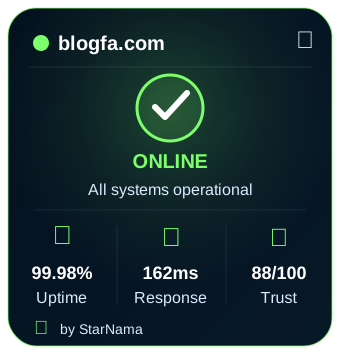
Live Widget Preview
StarNama Public Intelligence Directories
These public directory pages help users and search engines discover monitored websites by status, speed, security and trust signals.
Claim This Website
Are you the owner of blogfa.com? Claim it to add official notes, improve trust signals, and keep this profile more accurate.
/starnama-verification.txt, /.well-known/starnama-verification.txt, or DNS TXT fallback.
Website Change History
-
2026-09-18 09:23:04:
ip changed from
172.67.160.233to104.21.73.98. -
2026-09-07 23:20:02:
ip changed from
104.21.73.98to172.67.160.233. -
2026-09-03 15:59:22:
ip changed from
172.67.160.233to104.21.73.98. -
2026-08-31 21:10:03:
ip changed from
104.21.73.98to172.67.160.233. -
2026-08-29 20:10:06:
ip changed from
172.67.160.233to104.21.73.98. -
2026-08-26 22:02:05:
ip changed from
104.21.73.98to172.67.160.233. -
2026-08-23 14:20:03:
ip changed from
172.67.160.233to104.21.73.98. -
2026-08-22 11:15:46:
ip changed from
104.21.73.98to172.67.160.233.
Historical Uptime Reports
Uptime (last 90 checks): 100%
Last Downtime: No downtime recorded
Average Response Time: 131.58 ms
User Reports
blogfa.com has been reported 0 times today.
Quick Vote
👍 0 users say it's working | 👎 0 users say it's not
Performance Metrics
Loading performance data for blogfa.com...
Troubleshooting guide for blogfa.com
If you are facing issues while trying to access
blogfa.com , even though our system shows the website is online,
you can try the following step-by-step fixes.
Last checked from our server in
Canada, Toronto
at September 20, 2026, 12:24 am.
1- Clear Browser cookies and cached files
If blogfa.com is not loading properly , removing stored cookies and cached files in your browser usually restores access.
2- Force a hard refresh
Force-refreshing often clears temporary issues. Use CTRL + F5 to reload blogfa.com bypassing stored files.
3- Flush your DNS cache
DNS records may become outdated and prevent loading blogfa.com. Here is how to refresh them:
On Windows:
- Press the Windows key, type cmd, right-click on Command Prompt and choose Run as administrator.
- Type
ipconfig /flushdnsand press Enter. - Wait for the confirmation message, then restart your computer.
On macOS:
- Open Terminal (Applications → Utilities → Terminal).
- Type
sudo killall -HUP mDNSResponderand press Enter. - Enter your administrator password if asked, then restart your Mac.
4- Restart modem and router
- Turn off your modem/router using the power button.
- Wait about 30 seconds, then turn it back on.
- Once your internet connection is fully restored, restart your computer and revisit blogfa.com.
5- Try a web proxy
If you think your ISP is blocking blogfa.com, you can test through an online proxy service :
- Search Google for “free web proxy service”.
- Select a trustworthy provider and enter the website address.
- Access blogfa.com through the proxy interface to check if it loads.
6- Use a VPN
In some cases, access to blogfa.com may be restricted by region or blocked by your ISP. A VPN hides your real IP address and lets you browse as if you are in another location.
Popular VPNs you can try include :
- NordVPN
- ExpressVPN
- CyberGhost
Install the VPN of your choice , connect to a server , and then try opening blogfa.com again.
Related Website Status Checks
Explore other recently monitored websites and compare their live availability, response time and server signals.
FAQ about blogfa.com
Q: Is blogfa.com down right now ?
A: Our system reports: UP.
Q: Why is blogfa.com not loading ?
A: Possible ISP block, DNS error, or server Downtime.
Q: How can I check Uptime again ?
A: Refresh this page or recheck in the form above.
Q: Does blogfa.com have SSL ?
A: Valid (Expiry: Fri, 30 Oct 2026 00:55:14 +0000).